If you searched for how to stop review gating, the answer is to replace selective review requests with a neutral process that invites every eligible customer to share an honest opinion. You can still collect private support feedback, respond to complaints, and improve your rating—but you must not make a positive review a condition for receiving better treatment.
Key Takeaways

- Send the same review invitation to all eligible customers, not only people who select “satisfied.”
- Separate customer support from public review collection without using support to suppress negative reviews.
- Remove instructions such as “contact us before posting” when they’re intended to prevent criticism.
- Offer discounts, loyalty points, or gifts only when they are not tied to positive sentiment.
- Audit email sequences, surveys, QR codes, CRM rules, and employee scripts for selective routing.
- Keep records showing who was invited, when they were invited, and what wording they received.
What Review Gating Means
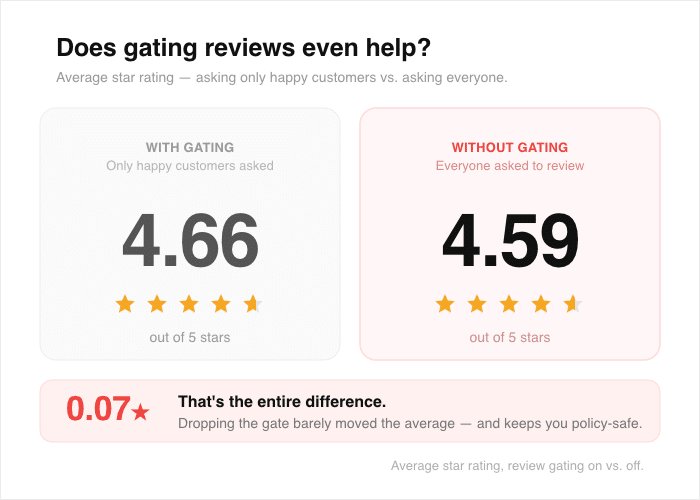
Review gating is a process that sorts customers according to their expected opinion before asking for a public review. A business may first ask, “How would you rate your experience?” Customers who choose four or five stars receive a link to Google, Yelp, Tripadvisor, or another review site. Customers who choose one to three stars are redirected to a private form, a support inbox, or nowhere at all.
The problem isn’t asking for private feedback. Private feedback can help identify service failures, refund requests, delivery problems, and product defects. The problem is using that private channel to screen out criticism while sending only likely positive reviewers to a public platform.
SMM & Reputation Growth
Grow Your Brand Online — Faster
Boost your social media presence and build a stronger online reputation with SMMSEO24. Trusted by businesses across the US.
- Fast Delivery
- 24/7 Support
- Secure Checkout
Common examples include:
- A text message that sends happy customers to Google and unhappy customers to a company form.
- A kiosk that displays a review QR code only after a customer selects a high score.
- A customer-service script that says, “Please give us a chance to fix this before leaving a review.”
- A CRM automation that invites customers only after a high net promoter score.
- A manager who asks satisfied customers for reviews but tells complaining customers not to post.
- A loyalty program that awards points only when a customer submits a five-star review.
A neutral process may ask customers about their experience first, but every eligible customer must receive the same public-review opportunity.
| Process | What happens | Review-gating risk |
|---|---|---|
| Neutral invitation | Every eligible customer receives the same public-review link | Low |
| Support-first workflow | Every customer can request help, then still receives the review invitation | Low to moderate |
| Sentiment routing | Positive responses go public; negative responses stay private | High |
| Five-star reward | Customers receive a benefit for a favorable review | High |
| Review reminder | All eligible customers receive one or more identical reminders | Low, if permitted by the platform |
Why You Should Stop
Stopping review gating protects the credibility of your review profile. A high rating produced by selective invitations may look attractive, but it can create a mismatch between public reviews and actual customer experiences. That mismatch can become especially visible when customers compare locations, products, social posts, or independent discussions.
There are compliance and platform-policy concerns. The Federal Trade Commission addresses deceptive reviews, suppression, and incentives.
Review gating can cause practical damage in several ways:
- Policy violations: Google Business Profile, Yelp, Tripadvisor, app stores, and industry directories may restrict or remove content that results from prohibited solicitation practices.
- Unreliable data: Your public rating stops reflecting the full range of customer experiences.
- Escalated complaints: A customer who feels blocked from speaking publicly may post elsewhere, where you have less ability to respond.
- Employee confusion: Staff members may improvise language that sounds coercive or retaliatory.
- Poor decisions: Leaders may overlook recurring problems because negative feedback is hidden in a disconnected inbox.
- Trust loss: Customers may question whether testimonials were selected or edited.
A fair process doesn’t guarantee a higher rating. It gives you a useful picture of performance. It can reveal issues with checkout, scheduling, billing, returns, service, or product quality.
Warning: Don’t assume that “private feedback” makes a selective system acceptable.
Audit Your Current Workflow
Start with an end-to-end audit rather than changing one email.
Collect every customer-feedback touchpoint:
- Purchase-confirmation emails
- Delivery and installation texts
- Point-of-sale receipts
- Post-appointment surveys
- Call-center scripts
- QR codes on packaging and invoices
- Website pop-ups
- Customer-success check-ins
- Loyalty-program messages
- Review-management software rules
- Franchise or location-level instructions
For each touchpoint, record the audience, trigger, message, destination, and follow-up.
| Audit item | Question to ask | Corrective action |
|---|---|---|
| Eligibility rule | Who is invited, and who is excluded? | Define one neutral eligibility rule |
| Sentiment filter | Does a score change the destination? | Remove score-based routing |
| Timing | Are requests delayed for unhappy customers? | Use the same timing window |
| Incentive | Is a reward tied to rating or wording? | Remove the rating condition |
| Staff language | Are customers asked to contact support first? | Make support optional and nonrestrictive |
| Data trail | Can you prove invitations were consistent? | Preserve campaign and recipient records |
Search for risky language
Use your email platform, CRM, help-desk macros, and shared drive to search for terms such as:
- “Five-star”
- “Happy”
- “Satisfied”
- “Only if”
- “Before you review”
- “Contact us first”
- “Make it right”
- “Leave positive feedback”
- “Give us a chance”
- “Don’t post”
Some terms may be harmless in context, but each deserves review.
Check every destination
A compliant workflow shouldn’t send unhappy customers to a dead end. Confirm that the public-review link appears for every eligible customer, regardless of survey response.
Build A Neutral Request

The simplest replacement is a single review invitation with the same wording and destination for every eligible customer. You may personalize the customer’s name, order number, location, or product, but don’t personalize the request according to sentiment.
A useful message contains four parts:
- A clear reference to the transaction or appointment.
- A neutral request for honest feedback.
- A direct link to the relevant review page.
- An optional support contact for unresolved issues.
Example email:
Thanks for visiting the Oak Street location on March 8. We’d appreciate your honest feedback about your experience. You can share it on our review page here: [review link]. If you need help with an unresolved order or service issue, contact support at [support address].
Example text:
Thanks for your recent purchase from Northside Hardware. Please share an honest review here: [review link]. For order help, call [phone number].
Avoid wording that pressures the customer toward a favorable result:
- “Please leave us five stars.”
- “Help us keep our perfect rating.”
- “Only post if you had a great experience.”
- “Contact us before leaving a negative review.”
- “Your review affects our employees’ bonuses.”
- “Leave a positive review and receive a coupon.”
| Message element | Use | Avoid |
|---|---|---|
| Opinion request | “Share your honest feedback” | “Tell everyone how great we are” |
| Review destination | One link for all eligible customers | Link shown only after a high score |
| Support option | “Contact us if you need help” | “Contact us instead of reviewing” |
| Incentive language | “No reward is tied to review content” | “Get a reward for five stars” |
| Timing | Same schedule for eligible customers | Delaying invitations to critics |
Keep support available
A neutral review process doesn’t require you to abandon service recovery. You can invite customers to contact support before, after, or alongside a review request. The important distinction is choice: customers shouldn’t lose access to the review page because they report a problem.
Pro Tip: Have legal, compliance, or operations staff approve one standard template.
Handle Negative Feedback
Negative reviews aren’t proof that the process failed. The goal is to respond calmly, protect privacy, and identify whether the complaint points to a fixable operational issue.
A strong public response usually includes:
- Acknowledgment of the customer’s concern
- Appreciation for the feedback
- A brief apology when appropriate
- No argument about motives or character
- No personal information
- A private contact route
- A clear next step
Example:
We’re sorry the delivery arrived late and that our communication didn’t meet expectations.
Triage the complaint
Use a consistent internal classification:
- Billing: incorrect charge, duplicate payment, missing refund
- Fulfillment: late delivery, damaged package, wrong item
- Service: rude interaction, missed appointment, unresolved call
- Product: defect, safety concern, performance problem
- Policy: return, cancellation, warranty, membership dispute
- Misidentification: reviewer can’t be matched to a transaction
- Abuse: threats, hate speech, personal information, or spam
Each category should have an owner and response target. A complaint about a damaged shipment may go to fulfillment; a suspected safety issue may require immediate escalation to quality or legal staff.
Know when to report
Use a platform’s reporting process when a review appears to be spam, contains private information, is clearly about another business, or violates the platform’s content rules. Don’t report a review merely because it’s negative, unfair, or damaging to your rating. A legitimate critical opinion is different from prohibited content.
Protect Incentives And Privacy
Incentives create risk when they’re connected to the content, rating, timing, or removal of a review. A business can often run a general customer-survey incentive, but the terms must be transparent and must not reward favorable sentiment.
Safer structures include:
- Entering all eligible survey respondents into the same drawing
- Offering a loyalty benefit for completing a private survey, regardless of answers
- Giving every eligible customer the same coupon after a purchase
- Paying employees for response rates or completed service follow-ups, not positive ratings
- Inviting honest feedback without requiring public posting
Riskier structures include:
- “Get $10 for a five-star review.”
- “Receive a gift after posting a positive review.”
- “Your coupon arrives after we verify the review.”
- “Keep your reward only if the review remains live.”
- “Employees receive bonuses for five-star ratings.”
| Incentive design | Review-content condition? | Risk level |
|---|---|---|
| Coupon automatically sent after purchase | No | Lower |
| Drawing for every completed survey | No | Lower |
| Reward for submitting any public review | Yes, public posting | Moderate |
| Reward for four- or five-star reviews | Yes, rating | High |
| Reward for deleting or changing criticism | Yes, removal or revision | Very high |
Privacy matters too. Don’t publish customer names, photos, testimonials, or messages without permission.
Warning: An incentive described as “for honest reviews” may still create a platform or disclosure issue if customers aren’t clearly told about it.
What Should You Do First?
If you need a practical stopping plan, make the public invitation neutral before redesigning every reporting dashboard. This reduces the immediate risk while preserving the feedback you already need for service improvement.
First 24 hours
- Pause campaigns that route customers by star rating.
- Disable “positive feedback only” automations.
- Remove five-star language from active email and text templates.
- Tell staff not to request review deletion or silence.
- Preserve a copy of the old workflow for your audit record.
First seven days
- Define one eligibility rule for customers, patients, guests, or subscribers.
- Send a replacement template to legal, compliance, and customer-service owners.
- Test the message with positive, neutral, and negative survey responses.
- Check mobile links, location links, and QR codes.
- Create an escalation path for billing, safety, privacy, and abuse issues.
- Train employees with two or three approved response examples.
First 30 days
- Compare invitation volume with completed transactions.
- Review whether any location, product, or employee group is excluded.
- Measure response rates without treating ratings as employee performance scores.
- Sample customer records to confirm consistent timing.
- Review incentives, contests, referral programs, and testimonial permissions.
- Archive old templates and remove obsolete versions from shared folders.
| Period | Owner | Deliverable |
|---|---|---|
| Day 1 | Marketing or CRM | Neutral invitation active |
| Days 2–7 | Operations | Eligibility and escalation rules |
| Days 2–7 | Customer service | Approved scripts and training |
| Days 8–30 | Analytics | Invitation and response audit |
| Day 30 | Compliance | Incentive and disclosure review |
Measure the right things
Track measures explaining customer experience:
- Invitations sent per completed transaction
- Delivery and bounce rates
- Response rate by channel
- Average time to first support response
- Resolution time for billing and fulfillment issues
- Repeat complaints by product or location
- Review volume by eligible customer population
- Themes in positive, neutral, and negative comments
A raw star average isn’t enough. A small rise in negative reviews may reflect better sampling rather than worse service.
Monitor Reviews And Responses
Monitoring should be structured, not reactive. Assign an owner for each platform and location, then define who can approve a public response. A small business may use a shared spreadsheet; a larger organization may use reputation-management software. The tool matters less than the rules.
Use a response matrix:
| Review situation | Public response | Internal action |
|---|---|---|
| Minor inconvenience | Acknowledge and invite contact | Log recurring theme |
| Billing dispute | Avoid account details; offer secure contact | Send to billing |
| Damaged product | Apologize and request order details privately | Inspect fulfillment record |
| Safety allegation | Avoid speculation; escalate immediately | Notify quality or legal |
| Spam or impersonation | Don’t debate publicly | Report through platform tools |
| Praise with specific employee | Thank the customer | Share recognition without pressure |
Responding to every review with the same generic phrase can appear dismissive.
Fix Common Failure Modes

“We need private feedback first”
You can collect private feedback first if the public-review invitation still reaches every eligible customer. Keep purposes clear: private feedback helps investigate; public reviews let customers share their experience.
“Negative reviews hurt our rating”
They may lower an average, but suppressing them doesn’t fix the issue.
“Employees ask only happy customers”
This happens at checkout or after a successful support interaction. Train employees to use a neutral line: “If you’d like to share honest feedback, you can use the link on your receipt.” Audit locations through scripts, signage, and manager check-ins.
“The software has a built-in filter”
Don’t assume the default setting fits. Ask the vendor how the system treats low scores, unresolved cases, refunds, and repeat customers.
“Customers want us to fix problems first”
Some customers prefer support before reviewing. Include both links: the public review page and support.
“A customer wants to remove criticism”
Explain that the business can’t require deletion. If the customer updates a review after resolution, don’t write it, offer payment, or condition resolution on a favorable revision.
Frequently Asked Questions
Is review gating illegal?
It can create legal and platform-policy problems, especially when a business suppresses negative opinions, misleads customers, or ties compensation to favorable review content. The exact rules depend on the country, industry, platform, and campaign. Review your process with qualified legal or compliance counsel before launching incentives or testimonials.
Can I ask for a five-star review?
A direct request for five stars is risky because it asks for a favorable rating rather than an honest opinion. Use wording such as “Please share your honest feedback” and send the same invitation to every eligible customer. Don’t condition service, refunds, discounts, or employee treatment on the rating.
Can I ask unhappy customers to contact support first?
You can invite unhappy customers to contact support, but don’t require it or hide the public-review link until they do. A support option should be presented as a way to resolve an issue, not as a substitute for the customer’s opportunity to publish an honest review.
Can I reward customers for reviews?
A reward tied to submitting any review may still violate a platform’s rules or require disclosure. Rewards tied to positive ratings, favorable wording, or deleting criticism are substantially riskier. If you use an incentive, make eligibility broad, disclose it clearly, and obtain platform-specific and legal guidance.
How do I know whether my software gates reviews?
Inspect the workflow’s branching rules and run test records with low, middle, and high survey scores. Confirm whether each test receives the same public-review link, timing, reminders, and support options. Ask your vendor for a written explanation of filters involving sentiment, refunds, complaints, locations, or customer status.
What should I do with existing gated reviews?
Stop the gating process, preserve relevant records, and ask qualified counsel whether any disclosures or corrective steps are appropriate. Don’t secretly replace, edit, or manipulate existing reviews. Update the workflow, train staff, and monitor future invitations for consistent treatment.
Conclusion
Replace the selective workflow today with one neutral message, one public-review destination, and one optional support path. Then audit the next 30 days of invitations against completed transactions. That small, documented change will make your feedback more representative and give your team better information for fixing the experiences that generate complaints.

WRITTEN BY
Ryan Thomas
Ryan Thomas writes about online review management, covering review monitoring, customer feedback, ratings, negative reviews, and reputation building. His practical insights help businesses manage reviews effectively, strengthen customer trust, improve their online reputation, and turn feedback into opportunities for long-term growth.
View all posts →