The most effective way to get more Google reviews is to ask satisfied customers directly, right after a positive experience, using a short, direct link to your review page. Create your review link through Google Business Profile, then share it via email, SMS, receipts, or a QR code at your physical location. Timing matters: request reviews shortly after a purchase, service completion, or positive support interaction, while the experience is still fresh.
Train staff to ask in person, since verbal requests often convert better than automated ones. Respond to every review, positive and negative, since active engagement signals credibility to both customers and Google’s ranking algorithm. Never offer incentives or buy reviews — Google’s policies explicitly prohibit this and can result in review removal or profile suspension. Consistent, steady review growth from real customers outperforms sudden spikes every time.
Why Google Reviews Matter for Small Businesses in the US
For small businesses, Google reviews influence far more than image. They affect how often people notice you in search results, how they compare you with competitors, and whether they decide to contact you. Many buyers read reviews before making a choice, especially when looking at local businesses.
SMM & Reputation Growth
Grow Your Brand Online — Faster
Boost your social media presence and build a stronger online reputation with SMMSEO24. Trusted by businesses across the US.
- Fast Delivery
- 24/7 Support
- Secure Checkout
That means online reviews can impact both trust and visibility. When your profile has a healthy flow of recent feedback, your business can look more active and credible. That can support stronger search presence, better click-throughs, and more chances to win new customers. Let’s break that down.
The Role of Google Reviews in Local Search Rankings
If you want better local search rankings, reviews matter. Google uses signals from your Google Business Profile to understand which businesses appear relevant and trusted. That includes review volume, review quality, and how active your listing looks over time.
When more people leave Google reviews, your business may gain stronger placement in Google Maps, the local pack, and regular search results. This does not mean reviews alone decide rank, but they are clearly part of the picture. A business with more recent and credible feedback often looks stronger than one with very little activity.
There is also a visibility effect. Star ratings stand out. A listing with steady user contributions can attract more attention, more clicks, and more inquiries. So if you are asking how getting more Google reviews impacts search ranking, the answer is simple: it can improve prominence, help local discovery, and support better search visibility.
How Google Reviews Influence Consumer Trust and Decisions
People trust people. That is why customer reviews act as social proof. When potential customers see detailed, recent, and balanced feedback, your online reputation becomes easier to believe. Even a mix of praise and occasional criticism can make your listing feel more real.
For small businesses, this trust matters at the exact moment someone is choosing between options. Many consumers read several reviews before buying. A strong review profile can reduce hesitation, especially when buyers do not know your brand yet.
Specific strategies can help increase Google reviews, but the goal is not only quantity. You also want genuine reviews that reflect a positive experience. Clear requests, easy access to the review page, and professional responses all help build consumer trust. In many cases, trust becomes the reason a customer chooses you over a nearby competitor.
Setting Up Your Business for More Reviews
Before you ask for reviews, make sure your setup is solid. Customers are more likely to leave Google reviews when your Google Business Profile looks complete, current, and easy to understand. A weak business profile creates confusion and lowers trust.
Start with the basics: correct contact details, service information, and a polished listing. These steps are among the most effective ways to get more Google reviews because they remove uncertainty. When customers can quickly confirm who you are and what you do, they are more willing to share online reviews. Here is how to prepare.
Claiming and Optimizing Your Google Business Profile
First, claim your Google Business Profile if you have not already. This gives you control over your business profile, lets you manage feedback, and allows you to respond to customer reviews. Without ownership, you are limited in how you support your online presence.
Once claimed, optimize the profile with your real business name, accurate hours, local phone number, business description, and clear photos. Google also allows short video content. These details help people feel confident that your listing is active and legitimate.
This matters because the most effective ways to get more Google reviews usually start with credibility. Customers need to know they found the right business. If your hours are wrong or your phone number is outdated, they may leave without taking action. A complete profile gives people fewer reasons to hesitate and more reasons to trust your review requests.
Ensuring Accurate Contact Details and Service Information
Accurate contact details are not just administrative. They shape the customer experience. Your business name, phone number, service information, and operating details should match what customers see elsewhere online. Consistency helps people feel they are dealing with the right company.
On your Google Business Profile, double-check every field. Is the phone number current? Are your service areas clear? Does the business name match your website and printed materials? These basics help customers find you and feel comfortable using your review link later.
You can also make your Google review link easier to use by keeping your information organized across channels. When the listing is clear, customers move faster from finding you to reviewing you. In other words, fewer errors mean less friction. That small improvement can lead to more completed reviews and a smoother path to customer feedback.
Creating and Sharing a Direct Google Review Link
One of the easiest wins is using a direct link to your review page. Instead of asking customers to search for your business, click around, and find the reviews section, send them straight there. Less effort usually means more customer feedback.
A Google review link turns review requests into a one-click action. That makes it easier for customers to respond while the experience is still fresh. Next, let’s look at how to find that link and how to share it in places your customers already see.
How to Find and Customize Your Google Review Link

Getting your Google review link is simple. Search your business on Google, open your Google Business listing, go to the reviews area, and click the option to get more reviews. Google then gives you a review link you can copy and use in messages, cards, or emails.
That direct path matters. Customers are much more likely to leave feedback when they land right on the review page. A long, messy URL can still work, but it is harder to remember and less useful on printed materials.
To make it easier to use, you can:
- Copy your review link from your Google Business Profile and test it yourself.
- Use a link shortener so the review link is cleaner and easier to share.
- Add the shortened link anywhere customers already interact with your business.
If your goal is convenience, this is one of the most practical changes you can make. A simple review link often outperforms a vague request to “find us on Google.”
Easy Ways to Share Your Review Link with Customers
Once you have your review link, put it where satisfied customers naturally look. The more visible it is, the more often people will use it. You do not need to push. You need to make the next step obvious.
A smart approach is to place the link across both digital and physical touchpoints. This helps you reach people whether they interact online, in person, or after the sale. It also keeps your review requests consistent.
Useful places to share it include:
- Your email signature, where customers see it in everyday communication.
- Social media posts that highlight positive Google reviews and invite others to share feedback.
- Business cards, thank-you notes, or postcards handed out after service.
- Your website footer or a dedicated review page.
Want to encourage satisfied customers? Ask while the experience is fresh, then send the review link right away. When the process takes seconds, happy customers are much more likely to follow through.
Simplifying the Process With QR Codes and Widgets
People are more likely to leave customer reviews when access is immediate. That is why a QR code and embedded website tools can help. They reduce clicks, remove confusion, and connect customers directly to your review page from wherever they are.
For many businesses, these are among the most effective ways to get more Google reviews. A quick scan or visible website prompt can turn a good moment into real feedback. Let’s look at how to use both without adding complexity.
Using QR Codes at Your Physical Location or On Materials
A QR code makes review collection faster in person. Customers scan, open the review link, and land on the right page without typing anything. That speed can improve the customer experience, especially at a physical location where attention is limited.
You can place the code in areas where customers already pause. Think counters, reception desks, exits, printed materials, or packaging. The goal is not to overdo it. It is to make reviewing feel simple and timely.
Good placements include:
- Business cards given out after a completed service.
- Thank-you postcards sent a week or two later.
- In-store signs or plaques near checkout or waiting areas.
If you want to encourage satisfied customers, pair the qr code with a short verbal ask. A friendly prompt from a team member, followed by an easy scan, often works better than either tactic alone.
Adding Google Review Widgets to Your Website and Emails
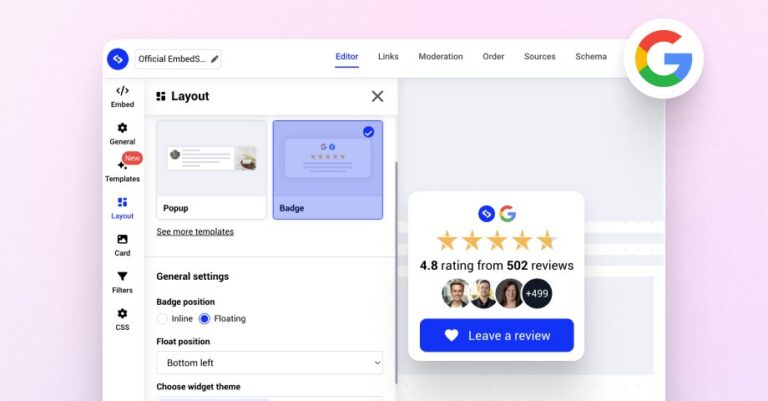
Widgets help bring your Google review page closer to the places customers already visit. On your website, a review widget can show existing feedback and create a clear path to leave a new review. In emails, linked review prompts act like gentle reminders.
This supports your online presence in two ways. First, it displays social proof. Second, it removes extra steps. If a customer reads good reviews on your site and sees a simple prompt to add their own, the action feels natural.
Practical options include:
- A website footer widget that appears across every page.
- A dedicated “Leave us a review” page with a visible call to action.
- Email templates that include a review button tied to your Google review page.
If you want more responses, make the ask subtle but visible. Customers should not have to hunt for the next step. A well-placed widget keeps momentum moving.
Effective Ways to Request More Google Reviews
The best review requests are timely, polite, and easy to act on. You do not need long explanations. You need a clear ask sent after a good interaction, when customer feedback is most likely to be positive and detailed.
This matters for both satisfied customers and new customers who are still forming an impression of your brand. A simple system can produce steady Google reviews without sounding pushy. Next, let’s cover timing and request wording so your outreach feels natural instead of forced.
Timing Your Ask for Maximum Impact
Timing is everything. The right time to ask is soon after a good experience, while the details are still fresh. If you wait too long, even happy customers may forget or lose interest. If you ask too early, the experience may not feel complete.
That is why many small businesses ask right after service completion, after a successful installation, or shortly after a purchase. In-person requests work well when the customer is clearly pleased. Text and email follow-ups are effective when sent soon after.
To encourage satisfied customers, listen for signals. Did they praise your staff? Did they say the process was smooth? Did they mention a great experience without being prompted? That is your opening. Ask while the emotion is positive and the memory is clear. A timely request often gets better customer feedback than a generic campaign sent days later.
Polite, Conversational Review Request Scripts and Templates
Good review requests sound human. They do not feel copied from a script, even when you use a template. Mention the customer’s name, keep the message brief, and connect the request to their positive experience. That keeps the tone warm and credible.
You can ask in person, by text, or by email. The wording should match the channel. Text should get to the point quickly. Email can include a little more context. In person, start with a short conversation, then ask.
Examples you can adapt:
- “Hey Larry Thomas, we’re glad you had a great experience. If you have a minute, would you mind sharing it on our review page?”
- “Thanks again for choosing us. Your feedback helps other customers feel confident. Here’s our review page if you’d like to leave a quick Google review.”
- “We really appreciate your positive experience with our team. Would you be open to putting that into a Google review?”
Keep it simple. The easier your message is to read, the easier it is to answer.
Leveraging Automated Email and SMS Campaigns
Automation helps you ask consistently without creating more manual work. For busy teams, that matters. Automated review requests sent through email or sms campaigns can reach customers at the right moment and include the exact review link they need.
Can reminder tools increase your number of Google reviews? Yes, they can improve consistency and response rates when the timing and message are right. The key is to keep requests respectful, useful, and compliant. Let’s look at the benefits and best practices.
The Benefits of Review Reminder Tools for Small Businesses
For small businesses, review reminder tools solve a simple problem: good intentions often get delayed. Staff get busy. Owners forget to follow up. Automated review requests create a repeatable process, so more customers actually receive the ask.
That consistency can improve response rates. A customer who does not leave feedback right away may respond later when a message arrives at the right time. SMS can work especially well because it is fast and direct, while email gives you room for a little context.
| Tool Type | Main Benefit | Best Use Case |
|---|---|---|
| SMS review reminders | Fast delivery and quick action | After a completed service or purchase |
| Email review requests | More context and branding space | Follow-up after support or project completion |
| Survey-to-review flow | Identifies engaged customers first | After collecting customer feedback |
Used well, review reminder tools can significantly increase feedback because they make review requests timely, consistent, and easy to complete.
Best Practices for Sending Automated Requests (and Staying Compliant)
Automation should never feel careless. The best automated review requests are short, polite, and sent after a real interaction. They direct customers to the review page without pressuring them or steering only happy people toward public feedback.
Staying compliant is just as important as getting responses. Google expects genuine reviews, not manipulated ones. That means no fake engagement, no fake reviews, and no filtering that blocks unhappy customers while promoting only positive ones.
Follow these basics:
- Send requests only after real customer interactions.
- Include a direct path to the review page and keep the wording neutral.
- Avoid anything that could create policy violations, such as offering rewards for reviews.
You should also test your timing. If requests arrive too often or too late, customer feedback will drop. A clean, honest system tends to perform better over time and protects your business from unnecessary risk.
Staff Training and Incentive Programs for Review Collection
Your team can play a big role in earning more Google reviews. After all, they create many of the customer moments that lead to customer reviews in the first place. With the right staff training, review collection becomes part of normal service rather than an awkward extra step.
That said, incentive programs need care. You want to motivate employees without crossing lines that can harm your online reputation. The next two sections explain how to guide your team, support good habits, and stay ethical while asking for feedback.
Motivating Your Team to Encourage Reviews
Staff training works best when it focuses on confidence and timing. Team members should know when to ask, how to ask, and how to recognize a satisfied customer. That turns review collection into a natural extension of strong customer service.
As a business owner, you can help by making the process simple. Give staff short scripts, clear expectations, and easy tools like printed cards or a qr code. They should never feel like they need to improvise from scratch.
Train your team to:
- Ask after a clearly positive interaction or resolved issue.
- Use conversational language instead of sales language.
- Offer the review link or QR code right away so the next step is easy.
When team members see that Google reviews support growth and reflect excellent service, they are more likely to participate. Clear guidance creates consistency, and consistency drives better results.
Incentivizing Ethically Without Violating Google’s Policies
This area needs caution. Offering incentives in exchange for Google reviews can create policy violations. That includes discounts, gifts, or rewards tied directly to leaving public feedback. It may look effective in the short term, but it puts your listing at risk.
Is it safe and effective to offer incentives for Google reviews? Based on the available guidance, no. It is better to focus on genuine reviews from real customers who had a genuine experience. Those reviews are more credible and more sustainable.
If you want to motivate your team internally, reward service quality, follow-up consistency, or process improvements instead of the review itself. Keep review requests neutral and open to all customers. That way, your system supports honest feedback, avoids compliance problems, and protects the long-term value of your business profile.
Responding to Google Reviews To Drive Further Engagement
Yes, responding helps. When you reply to Google reviews, you show customers that their voice matters. That creates stronger engagement, supports customer feedback loops, and shows potential buyers that your business pays attention. It also gives you a chance to reinforce positive experiences publicly and address negative reviews before they define your online reputation.
Responses matter for more than optics. People want to feel heard. A thoughtful reply can make a happy customer feel appreciated, and a frustrated one feel respected. It also signals to future reviewers that leaving feedback is worth their time because someone on your team will actually read it. That can lead to more review activity over time.

How Timely Responses Encourage More Reviews
Timely responses show that your business is active. When people see fresh replies under google reviews, they can tell you are paying attention. That strengthens customer satisfaction because feedback feels acknowledged instead of ignored.
There is also a practical effect. A customer considering whether to leave a positive review is more likely to do it if they believe the business values feedback. Your replies become proof. They show excellent service does not stop after the transaction.
Negative comments matter too. A calm public response, followed by an offer to continue offline, can soften the impact of criticism. It also tells others that your business is accountable. So yes, timely responses can lead to getting more reviews. They create a visible culture of listening, and that often encourages more customers to share their own experiences.
Staying Compliant: Do’s and Don’ts When Asking for Reviews
Getting more Google reviews should never come at the cost of compliance. If you cut corners with review gating, fake reviews, or manipulative tactics, you risk losing trust and damaging your Google Business Profile. The safest approach is also the strongest one: ask honestly and collect real feedback.
That means knowing what Google allows and avoiding the shortcuts that create problems later. In the next sections, we’ll cover key guidelines and common mistakes so your review strategy stays clean, effective, and sustainable.
Google’s Guidelines You Must Follow
Google’s guidelines are built around authenticity. Reviews should come from real customers sharing real experiences. Your Google Business Profile is not the place for fake engagement, manufactured praise, or tactics that hide honest criticism.
This also means you should treat all customers fairly when asking for feedback. Do not screen people first and only send happy customers to public review sites. That kind of review gating creates compliance problems and can distort the real customer experience.
Keep these rules in mind:
- Ask for honest Google reviews from actual customers only.
- Do not buy reviews or create fake engagement.
- Do not direct only positive respondents to your Google Business Profile while blocking others.
If your review strategy feels transparent, it is usually on the right track. Genuine reviews help far more than risky shortcuts, and they protect the long-term value of your listing.
Common Pitfalls to Avoid
Many businesses make mistakes not because they mean harm, but because they want faster results. The problem is that poor review requests can damage compliance and trust. A short-term tactic can create long-term issues for your profile.
One common pitfall is asking in a way that pressures people. Another is using fake reviews to boost the number of reviews quickly. Some businesses also rely on review gating, sending only happy customers to public platforms while pushing others into private channels.
Avoid these mistakes:
- Offering rewards or perks tied to leaving a review.
- Posting or purchasing fake reviews.
- Filtering who gets the public review request based on expected positivity.
A better path is consistency. Ask all real customers politely, make the process easy, and let the feedback be genuine. That approach protects your reputation and keeps your review system credible.
Real-Life Examples of Successful Review Requests
Sometimes the hardest part is knowing what to say. The good news is that successful review requests are usually simple. They reference the customer’s recent experience, explain why feedback matters, and include a direct path to the review page.
These examples work because they sound natural, not scripted. They also fit different moments, from in-person conversations to text follow-ups. Let’s look at practical wording and ways to tailor Google review requests based on the customer type and situation.
Scripts and Scenarios Small Businesses Can Use
Small businesses do well with review scripts that feel personal. Use the customer name when possible, mention the service they received, and connect the request to their positive experience. That makes the ask feel relevant instead of automatic.
In person, a short conversation can lead naturally into the request. By text, get to the point faster. By email, add a brief sentence explaining that feedback helps other customers make informed decisions. Each format can work if it stays clear and human.
Try lines like these:
- “Hey [Customer Name], we’re so glad everything went well. If you have a minute, could you share your experience in a Google review?”
- “Thanks for your feedback today. Would you mind putting that into Google reviews so others can see it too?”
- “We appreciate your business. Here’s our review link if you’d like to leave a quick note about your experience.”
The best scripts are easy to say and easy to act on.
Approaches Tailored to Different Types of Customers
Not every customer responds the same way, so your review requests should reflect the context. A repeat buyer may need only a short reminder. A first-time customer may need reassurance that the process is quick and helpful. Good customer service includes reading the situation.
For satisfied customers who praise your team in person, ask right away and offer a card or QR code. For customers who engage more by phone or email, send the link soon after the job is done. Match the method to the customer experience.
Use approaches such as:
- In-person asks for customers who express strong satisfaction on the spot.
- Text requests for quick-service or mobile-first customers.
- Email follow-ups for longer projects where more context helps.
Yes, there are specific strategies small businesses can use to increase Google reviews. The strongest ones are simple, timely, and adjusted to how each customer already prefers to communicate.
Monitoring, Managing, and Growing Your Reputation Over Time
Getting reviews is only the start. Long-term results come from watching patterns, responding to customer feedback, and improving how your business asks over time. That is what turns occasional wins into steady review growth and stronger customer sentiment.
A good reputation management process helps you see what is working and what needs adjustment. It also helps protect your online reputation when issues appear. Next, we’ll cover what to track and when outside support may make sense for growing businesses.
Tracking Review Growth and Customer Sentiment
You cannot improve what you do not watch. Tracking review volume, average rating, and recurring themes in customer feedback helps you understand whether your process is working. It also shows where service issues may be affecting your online reputation.
Start simple. Look at how many reviews you receive each month, whether the average rating is moving, and what customers mention most often. Review growth is not only about numbers. Customer sentiment tells you what buyers actually value and where they see friction.
Watch these indicators:
- Review volume over time
- Average rating trends
- Common praise or complaints in written reviews
How fast will you see impact? It varies. Some businesses notice stronger engagement and search results after a steady increase in recent feedback, while broader reputation gains build over time. The key is consistency, not a one-time push.
Utilizing Reputation Management Services like smmseo24.com
As review activity grows, some businesses need help keeping the process organized. That is where reputation management support services can be useful. A reliable partner can help you streamline assets, keep messaging consistent, and support stronger handling of online reviews.
If you want a trusted option for reputation management and digital marketing assets, consider SMMSEO24. For business owners and local agencies, smmseo24.com can fit naturally into a broader system for managing Google reviews and maintaining visibility across channels.
A useful support setup can help with:
- Organizing review request assets and outreach materials
- Strengthening consistency across websites, emails, and social platforms
- Supporting a more structured reputation management workflow
The goal is not to replace your customer relationships. It is to make it easier to encourage satisfied customers to leave a Google review and to manage your reputation with less friction.
Frequently Asked Questions
How fast will I see an impact from increased Google reviews?
Results vary by business, but a steady rise in review volume can influence Google review visibility, customer trust, and search results over time. Some businesses notice engagement improvements fairly quickly, while broader online reputation gains build gradually. Future studies may clarify timing further, but consistency is the key factor.
Can Google review reminder tools significantly increase feedback?
Yes, review reminder tools can significantly improve feedback when used well. They help small businesses send automated review requests consistently and at the right time. That often boosts response rates because customers receive a direct, convenient prompt soon after a positive interaction with your business.
Is it safe and effective to offer incentives for Google reviews?
No, offering incentives for Google reviews is not the safest approach. It can create policy violations and may lead to business profile restrictions. The better strategy is to earn genuine reviews through excellent service, simple review requests, and easy access to your review page.
In conclusion
boosting your Google reviews is an essential strategy for enhancing your small business’s online presence and credibility. By implementing the actionable steps outlined in this guide—such as optimizing your Google Business Profile, utilizing direct review links, and engaging with your customers through automated outreach—you can foster a culture of feedback that not only attracts new customers but also builds trust in your brand.
Remember to stay compliant with Google’s guidelines to maintain ethical standards in your review requests. For further assistance in managing your reputation and digital marketing efforts, consider partnering with a trusted solution like smmseo24.com. Start cultivating those positive reviews today!

WRITTEN BY
Ryan Thomas
Ryan Thomas writes about online review management, covering review monitoring, customer feedback, ratings, negative reviews, and reputation building. His practical insights help businesses manage reviews effectively, strengthen customer trust, improve their online reputation, and turn feedback into opportunities for long-term growth.
View all posts →